


The upcoming release of MAPublisher 8.4 introduces many new features. One of the new features is called Join Areas. We have received a lot of requests from our customers to create area objects by merging common attribute values. This geoprocessing function is generally known as “dissolve”.
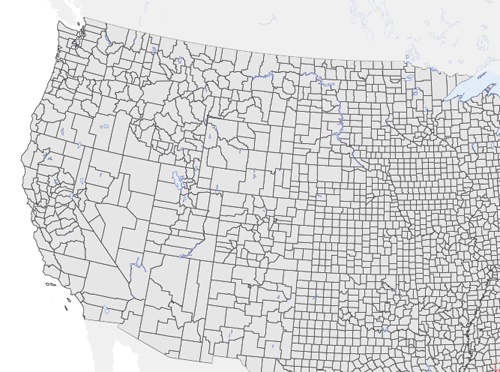
The picture below shows polygon objects from a USA Counties layer. The goal is to create a layer with state boundaries and summing the population count by joining the objects of the counties layer.
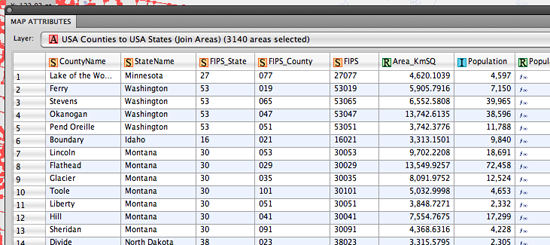
In the MAP Attributes panel of the USA Counties layer, every object of the counties layer contains attribute information including county name, state name, FIPS codes, area in km2, population and so on. We’ll be using the StateName attribute value to combine all the county polygons into one polygon per state.
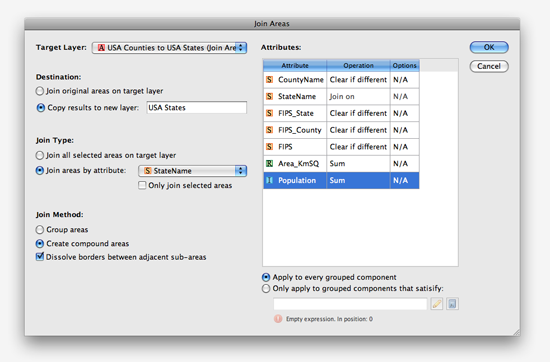
This is the new Join Area dialog box. On the left side, we’ll specify 1) target layer, 2) destination (output) layer, 3) join type and 4) join method. We are trying to create state boundaries from the counties target layer so we’ll select a join type based on the StateName attribute and output it to a new layer called USA States. The join will create compound paths and since our goal is to create state polygons, we’ll dissolve borders between adjacent sub-areas.
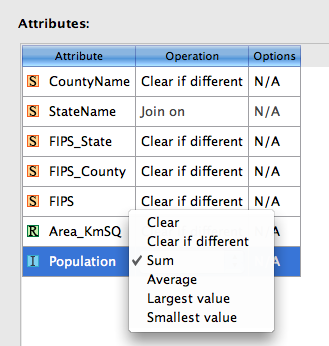
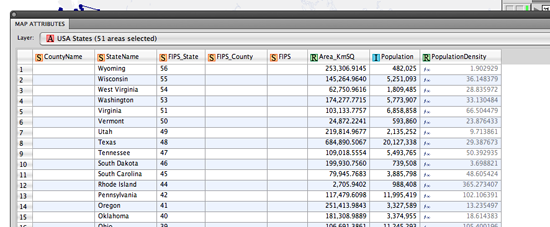
On the right side of the dialog box are attribute value operations available for each column. These operations determine what kind of the values will result for every attribute and the operations available are different for each data type (String, Real, Integer). The screenshot below shows the attribute value operation set to Sum for Population attribute (Integer data type). When the Join Area is complete, each state polygon will have the sum of the population of all the counties that belong to it.
After running the Join Areas function, county polygons are dissolved into state boundaries.
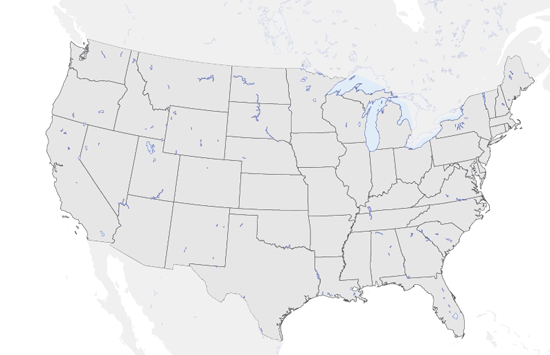
The population values show the total sum from all the counties for every state.
This is just one example of how Join Areas can be used. It was initially a feature request and with some discussion and planning, it became real. If you have any feature requests for MAPublisher, Geographic Imager or PDF Maps, please feel free to drop us a line at support@avenza.com. We’re happy to hear from all of you!